


Relias Learner
3.7264.00 Reviews
App Specs
- Version
- 3.0.308793
- Updated On
- License
- Free
- Downloads
- 100,000+
- Developer
- Relias Mobile
- Categories
- Education
- Platform
- Android
Screenshots

 Analysis by AppCompare
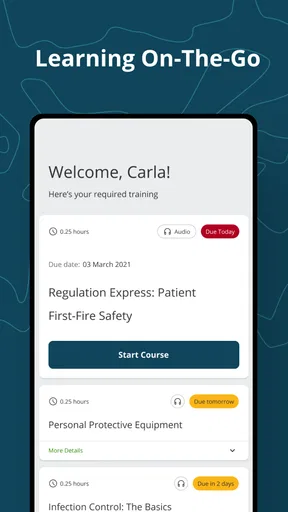
Relias Learner is the kind of education app I would judge less like a casual study tool and more like a work companion. It is built by Relias Mobile for completing Relias training away from a desktop, which makes its value depend heavily on how smoothly it fits into an employer’s learning routine. I found the idea useful: open the app when I have a few minutes, continue assigned learning, and avoid needing a computer for every course. At the same time, this is not a general-purpose learning platform with a large public library. It is most relevant when an organization already uses Relias for training.
The app is free to install and has an Everyone content rating, so the main question is not whether it is suitable for a particular age group or whether there is an upfront purchase. The more important question is whether your workplace, school, or organization has given you access to Relias training. Without that connection, the app has little reason to remain on your phone. With it, the app can turn small gaps in the day into useful study time.
Where the real friction usually begins
In my experience, the first difficulty with a training app is often not the lesson itself. It is getting into the correct account. Relias Learner is tied to Relias training access, so a person who downloads it expecting to browse open courses may feel confused when the useful content is not immediately available. I would first confirm that the organization has provided a Relias learner account and that I am using the same sign-in details associated with my assigned training.
This matters because a perfectly installed app can still appear unhelpful when the account is wrong, inactive, or connected to a different organization. If a colleague can see a course and I cannot, I would not immediately assume that the phone application is broken. The assignment may belong to another profile, or the organization may need to place the course in my learner account before it appears.
Another common sticking point is expecting the mobile experience to behave exactly like a desktop training portal. A phone is convenient for reading and completing short learning tasks, but it has a smaller screen and less room for navigation. Long instructions, embedded checks, or detailed course material can feel more tiring on a mobile display. I prefer using the app for continuation and review rather than assuming it will always be the most comfortable place to begin a lengthy course.
The most useful mindset is to treat Relias Learner as an access point for assigned training, not as an independent course marketplace. That distinction explains many apparent problems before any troubleshooting begins. If your employer has not assigned anything, the app may be working normally even though the screen feels empty.
What to check before blaming the app
I would begin with the basics: confirm the phone is running a compatible operating system, install the current version available for the device, and make sure the internet connection is stable during sign-in. The app supports Android 8.0 and later, which covers many phones but still leaves older devices outside its supported range. If the device is below that requirement, changing passwords or reinstalling will not solve the underlying compatibility issue.
Worth Reading Before You Choose

EA SPORTS FC Mobile 26 Is a Bigger Football Game, but It Takes Time

Flipboard Shows What News Apps Must Do Beyond the Feed

Switching to Android Auto Means Rethinking Your Driving Routine

Google Calendar Makes a Crowded Week Easier to Manage

Ludo King Makes the Most of the Minutes Between Plans

Baby Panda World Brings Quick Play to Modern Phones, but Its Game Library Feels Busy
Next, I would check the exact account information supplied by the organization. Small differences in usernames, work email addresses, and passwords can send a user toward the wrong profile. I would also check whether the organization uses a particular sign-in route or instructions, rather than relying on assumptions from another employee. Training systems are often configured around an employer’s own process, so two people using the same app may not have identical access.
It is also worth checking the simple conditions that affect any connected app. A weak connection can interrupt sign-in or leave a course page appearing incomplete. Switching between a reliable Wi-Fi connection and mobile data can help identify whether the problem follows the network. I would avoid repeatedly tapping a button when the screen appears slow; waiting briefly and then trying once more is less likely to create confusion than opening several overlapping attempts.
Before starting an important module, I would close other demanding apps, plug in the phone if the session may be long, and choose a place where interruptions are unlikely. That sounds ordinary, but it is especially useful for workplace learning. A notification, incoming call, or accidental app switch can make it harder to remember which screen was last completed.
A safer setup routine for a first session
My preferred first-session routine is deliberately small. I sign in, locate the assigned learning, open one item, and confirm that the content loads correctly before planning a long study block. This gives me a quick answer to the practical questions that matter: does the account show the expected training, does navigation respond, and can I return to the same course after leaving it?
I would then note the course name and the point where I stopped, especially if the training is required for work. I would not rely entirely on memory after switching between phone and computer. A short personal note such as “last completed section” can make recovery easier if the app closes or the session is interrupted. I would keep that note free of passwords or sensitive workplace information.
If the first course opens but later material does not, I would test another assigned item if one is available. That comparison helps separate an account-wide problem from an issue limited to a particular course. If nothing appears at all, I would contact the organization’s training administrator with the account used, device type, app version, and a plain description of what is visible. That is more useful than simply reporting that “the app does not work.”
Recovering a disrupted training session
Training rarely happens in perfect conditions. A work call can interrupt a lesson, a phone can lose its connection, or the app can be closed before a screen finishes loading. When that happens, I would reopen Relias Learner and look for the assigned course rather than repeatedly trying to recreate the exact previous tap sequence. If the course opens, I would check the last clearly completed section and continue carefully.
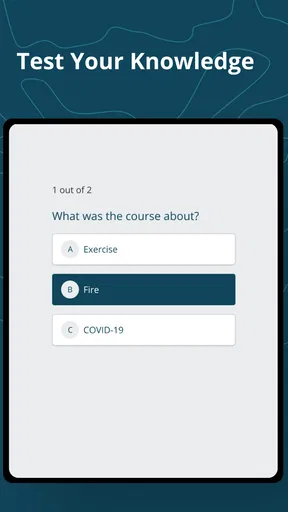
I would also distinguish between saved progress and merely viewed content. Seeing a page is not always the same as completing the action required by a training system. If a lesson includes a confirmation, knowledge check, or completion step, I would make sure that step has visibly registered before leaving. I would not assume that reaching the end of a screen automatically records everything.
If the app closes during a session, my first recovery attempt would be simple: reopen it, confirm the connection, and retry the course once. If the same screen repeatedly fails, I would stop cycling through the same action. I would record the course title, the screen or activity where the problem occurs, and whether the issue happens on both Wi-Fi and mobile data. This information gives a supervisor or support contact something concrete to investigate.
Reinstalling can be tempting, but I would treat it as a later step rather than the first response. Removing an app can clear local session information and create another sign-in task. Before doing that, I would make sure I know the correct account details and that my organization can help if the login needs to be restored. A reinstall is most sensible when ordinary reopening and connection checks have not helped, not simply because one page loaded slowly.
Using phone and computer without creating confusion
One of the app’s practical strengths is flexibility between places. I might begin a module on a computer at work and continue on my phone during a quiet break, or use the phone for a short review before returning to a larger screen. That flexibility is valuable, but switching devices mid-course can make progress appear inconsistent if the account has not finished updating.
For that reason, I prefer ending a session cleanly before moving to another device. I complete the visible step, wait for the next screen or confirmation to appear, and then leave the course instead of immediately closing the app. If the next device does not show the expected position, I avoid completing the same activity repeatedly without checking first. Duplicate attempts can make it harder to tell whether the issue is synchronization, account access, or course design.
A larger screen is usually the better choice when I need to read dense material, inspect detailed instructions, or work through a long uninterrupted lesson. The phone is better when convenience is the priority: checking assigned items, continuing a manageable section, or using a few spare minutes productively. This is not a criticism of the app; it is a realistic trade-off of mobile learning.
When the app is not actually the cause
Some problems belong to the training account or organization rather than the mobile software. An assignment may not yet be published, a deadline may be controlled by an administrator, or a learner profile may have been created with an incorrect email address. From the user’s point of view, all of these can look like missing content. The fastest route is often to ask the training contact to verify the assignment and account status.
There is also a difference between a technical failure and a course that is simply difficult to navigate. If the app responds normally but the lesson instructions are unclear, that is a content or design concern. I would capture the wording of the confusing step and ask the responsible training contact for clarification rather than repeatedly restarting the application.
Network restrictions can create another misleading symptom. A workplace connection may handle ordinary browsing while interfering with a particular service, or a temporary connection change may leave the app waiting indefinitely. Testing from a different trusted connection can help identify that pattern. I would never share workplace credentials with an unofficial helper or install unknown software just to force a course to load.
The same caution applies to support conversations. I would provide only the information needed to identify the problem: the learner account or approved work contact, the device, the operating system, the app version, and the steps that reproduce the issue. I would not send a password or private training material in a screenshot. Good troubleshooting should reduce risk, not create another one.
Who will get the most from it
Relias Learner makes the most sense for people whose organizations already rely on Relias training and who need access away from a desk. Healthcare and care-related workers, new employees completing required learning, and staff fitting training around changing shifts are the clearest examples. The app is especially practical when the alternative is waiting for access to a shared computer.
It can also suit learners who prefer short, repeatable sessions. I like the idea of using a break to continue one assigned activity, then returning later without turning training into a large evening task. The key is to choose a realistic stopping point and leave enough time for the current step to register. Convenience helps only when it is paired with a little attention to progress.
I would skip it as a primary learning tool if I am looking for open courses, creative tutorials, language practice, or a broad catalog that I can explore independently. Relias Learner is not the kind of app I would install for casual browsing. Its usefulness comes from its connection to assigned Relias education, so people without that connection should look for a platform designed for self-directed study.
How it compares with usual alternatives
Compared with completing training only through a desktop browser, the mobile app offers a clear convenience advantage. I can use it in places where a computer is impractical, and that can make required learning easier to fit around work. The trade-off is a smaller interface and a greater chance of interruption, so the desktop remains preferable for long or visually demanding sessions.
Compared with general education apps, its focus is narrower. A broad learning platform usually wins for discovery, variety, and independent course selection. Relias Learner wins when the required material already lives inside the Relias environment and I need a direct way to reach it. Choosing between them is less about which app is universally better and more about whether I need assigned professional training or a public learning library.
Its current version is 3.0.308793, and the app has been available since October 18, 2022. I mention those details because they help when reporting a problem to support: identifying the exact version and device context is more useful than giving a vague complaint. The developer is Relias Mobile, and the app has passed one hundred thousand installs, with an average rating of 3.6 from roughly six hundred ratings. That reception suggests a useful but not friction-free experience, which matches my view: it can be valuable in the right account setup, but it is not immune to access and workflow frustrations.
My practical verdict
I would recommend Relias Learner to anyone who has active Relias training and wants a reasonable way to continue it from a phone. Its strongest quality is not entertainment or exploration; it is removing the need to be tied to a desktop for every assigned lesson. For shift workers and busy learners, that small change can make required education easier to manage.
I would approach it with realistic expectations. Confirm the account before judging the app, test one course before committing to a long session, use a stable connection, and keep track of where you stopped when moving between devices. If content is missing or a course remains blocked, involve the organization’s training administrator instead of assuming that reinstalling will fix an assignment problem.
Overall, I see it as a useful companion to an existing Relias learning program rather than a standalone education destination. It is free, accessible on supported Android devices, and appropriate for general audiences, but its value depends on organizational access. If your training is already assigned through Relias, I would keep it installed; if you want independent courses, I would choose a broader education app instead.
Pros
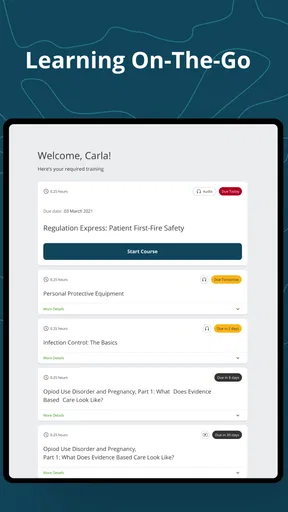
- Clear course structure makes assigned training easy to follow.
- Progress tracking helps learners see completed and remaining requirements.
- Works well for mandatory workplace education and compliance courses.
- Course reminders can help users stay on top of upcoming deadlines.
- Accessible on mobile
- allowing training away from a desktop computer.
Cons
- Some courses may feel lengthy or repetitive for experienced professionals.
- App performance can depend on the organization’s Relias configuration.
- Certain training content may require a stable internet connection.
- Navigation and available features vary between employer-managed accounts.
- Limited usefulness if your organization does not assign Relias courses.
FAQs for Relias Learner
What is Relias Learner used for?
Relias Learner is a mobile learning platform designed for employees and organizations using Relias training services. It lets learners access assigned courses, complete lessons, review training materials, and track progress from a supported mobile device. The exact content depends on the organization’s Relias account, role, and required training program, so available courses can vary significantly between users.
How do I log in to Relias Learner?
To use Relias Learner, you generally need an active Relias account provided through your employer, school, or organization. Login details and access instructions may be different depending on the organization’s setup, and some users may need a specific organization code or portal address. If your credentials do not work, contact your administrator rather than creating a separate personal account.
Can I complete Relias courses offline?
Offline availability depends on the course, app version, account configuration, and the policies established by your organization. Some learning materials may be available for temporary offline access after being opened or downloaded, while quizzes, completion records, and compliance updates may require an internet connection. It is best to reconnect before leaving the app so your progress can synchronize correctly.
Does Relias Learner track course completion and certificates?
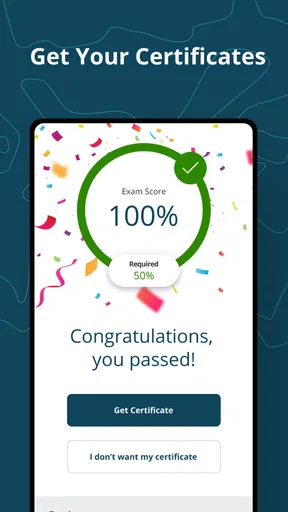
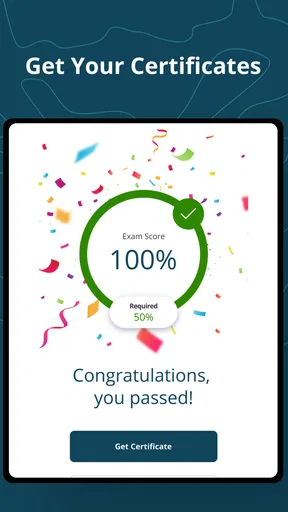
Relias Learner is intended to record learning activity associated with your organization’s Relias account, including progress and completed assignments. Whether certificates, completion dates, scores, or compliance records are visible in the mobile app depends on the course and administrator settings. After finishing training, allow the app to synchronize and check your organization’s learning portal if a formal certificate is required.
Is Relias Learner free to download and use?
The app may be available to download without a separate purchase, but access to its training content is normally controlled by an employer, institution, or other organization with a Relias subscription. Downloading the application alone does not necessarily provide access to courses. Before installing it, confirm that your organization uses Relias and ask an administrator for the correct login instructions and support contact.


